

Laravel Collections groupBy() Method: จัดกลุ่มข้อมูลอย่างมีประสิทธิภาพ
สวัสดีครับนักพัฒนา Laravel ทุกท่าน! วันนี้เราจะมาพูดถึงหนึ่งใน methods ที่ทรงพลังมากของ Laravel Collections นั่นคือ groupBy() method ซึ่งเป็น method สำหรับจัดกลุ่มข้อมูลตาม key ที่กำหนด ทำให้การจัดการและวิเคราะห์ข้อมูลทำได้ง่ายและเป็นระบบมากขึ้น
บทนำ – groupBy() คืออะไร?
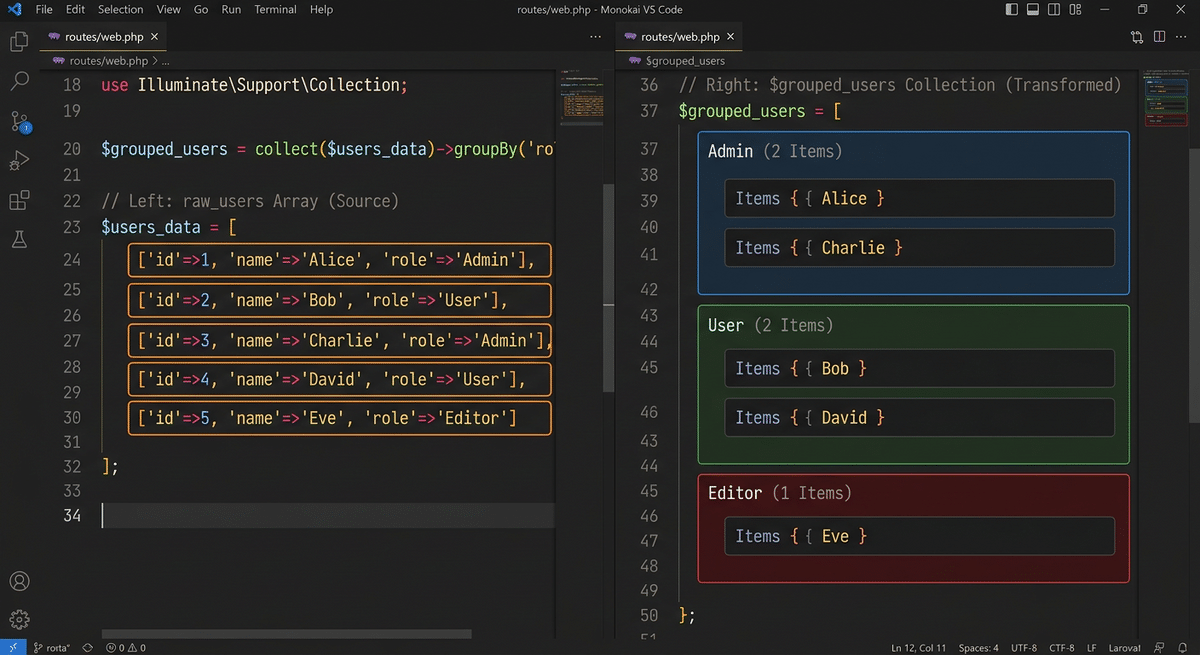
Laravel Collections เป็น class ที่ช่วยให้เราจัดการกับ arrays ได้อย่างมีประสิทธิภาพ โดย groupBy() method เป็น method สำหรับจัดกลุ่ม (group) รายการใน Collection ตาม key ที่กำหนด ผลลัพธ์ที่ได้คือ Collection ใหม่ที่มี key เป็นค่าที่ใช้จัดกลุ่ม และ value เป็น Collection ย่อยที่มีรายการในกลุ่มเดียวกัน
ทำไมต้องใช้ groupBy()?
ลองนึกภาพว่าคุณมีรายการ orders หลายร้อยรายการ และต้องการจัดกลุ่มตาม status เพื่อดูว่าแต่ละ status มีกี่ orders หรือต้องการจัดกลุ่ม users ตาม role เพื่อส่ง email แยกประเภท นี่คือจุดที่ groupBy() ทำให้ชีวิตเราง่ายขึ้นมาก
$sales = collect([
    ['product' => 'Keyboard', 'region' => 'North', 'amount' => 150],
    ['product' => 'Mouse', 'region' => 'South', 'amount' => 80],
    ['product' => 'Monitor', 'region' => 'North', 'amount' => 500],
    ['product' => 'Keyboard', 'region' => 'South', 'amount' => 120],
]);

$grouped = $sales->groupBy('region');

// Result:
// [
//     'North' => Collection([...]),  // 2 items
//     'South' => Collection([...]),   // 2 items
// ]
การใช้งานพื้นฐาน
จัดกลุ่มด้วย String Key
รูปแบบพื้นฐานที่สุดของ groupBy() คือการระบุ key เป็น string:
$products = collect([
    ['name' => 'Keyboard', 'category' => 'Electronics'],
    ['name' => 'Table', 'category' => 'Furniture'],
    ['name' => 'Mouse', 'category' => 'Electronics'],
    ['name' => 'Chair', 'category' => 'Furniture'],
]);

$grouped = $products->groupBy('category');

/*
Collection {
    'Electronics' => Collection([
        ['name' => 'Keyboard', 'category' => 'Electronics'],
        ['name' => 'Mouse', 'category' => 'Electronics'],
    ]),
    'Furniture' => Collection([
        ['name' => 'Table', 'category' => 'Furniture'],
        ['name' => 'Chair', 'category' => 'Furniture'],
    ]),
}
*/
จัดกลุ่มด้วย Callback Function
บางครั้งเราต้องการจัดกลุ่มด้วยเงื่อนไขที่ซับซ้อนกว่าการใช้ key ตรงๆ groupBy() รองรับ callback function ทำให้สามารถกำหนดเงื่อนไขการจัดกลุ่มได้อย่างยืดหยุ่น:
$users = collect([
    ['name' => 'John', 'age' => 25],
    ['name' => 'Jane', 'age' => 32],
    ['name' => 'Bob', 'age' => 19],
    ['name' => 'Alice', 'age' => 28],
]);

// จัดกลุ่มตามช่วงอายุ
$grouped = $users->groupBy(function ($user) {
    if ($user['age'] < 25) return 'Young';
    if ($user['age'] < 30) return 'Adult';
    return 'Senior';
});

/*
Collection {
    'Young' => Collection([[name' => 'Bob', 'age' => 19]]),
    'Adult' => Collection([[name' => 'John', 'age' => 25], ['name' => 'Alice', 'age' => 28]]),
    'Senior' => Collection([[name' => 'Jane', 'age' => 32]]),
}
*/
Multiple groupBy()
Laravel Collections รองรับการจัดกลุ่มหลายระดับ (multi-level grouping) โดยการส่ง array ของ keys:
$orders = collect([
    ['product' => 'Keyboard', 'status' => 'completed', 'amount' => 150],
    ['product' => 'Mouse', 'status' => 'pending', 'amount' => 80],
    ['product' => 'Keyboard', 'status' => 'pending', 'amount' => 120],
    ['product' => 'Mouse', 'status' => 'completed', 'amount' => 90],
]);

// จัดกลุ่ม 2 ระดับ: ก่อนตาม status แล้วตาม product
$grouped = $orders->groupBy(['status', 'product']);

/*
Collection {
    'completed' => Collection({
        'Keyboard' => Collection([...]),
        'Mouse' => Collection([...]),
    }),
    'pending' => Collection({
        'Keyboard' => Collection([...]),
        'Mouse' => Collection([...]),
    }),
}
*/
การใช้งานร่วมกับ Methods อื่นๆ
ความแข็งแกร่งที่แท้จริงของ groupBy() คือการใช้ร่วมกับ methods อื่นๆ ของ Collection:
รวมกับ map() และ count()
$users = collect([
    ['name' => 'John', 'role' => 'admin'],
    ['name' => 'Jane', 'role' => 'user'],
    ['name' => 'Bob', 'role' => 'admin'],
    ['name' => 'Alice', 'role' => 'user'],
]);

$roleCounts = $users
    ->groupBy('role')
    ->map(fn($group) => $group->count());

// Collection {
//     'admin' => 2,
//     'user' => 2,
// }
รวมกับ sum()
$sales = collect([
    ['product' => 'Keyboard', 'amount' => 150],
    ['product' => 'Mouse', 'amount' => 80],
    ['product' => 'Keyboard', 'amount' => 200],
    ['product' => 'Mouse', 'amount' => 60],
]);

$salesByProduct = $sales
    ->groupBy('product')
    ->map(fn($items) => $items->sum('amount'));

// Collection {
//     'Keyboard' => 350,
//     'Mouse' => 140,
// }
รวมกับ pluck()
$employees = collect([
    ['name' => 'John', 'department' => 'Engineering', 'skills' => ['PHP', 'JavaScript']],
    ['name' => 'Jane', 'department' => 'Marketing', 'skills' => ['SEO', 'Content']],
    ['name' => 'Bob', 'department' => 'Engineering', 'skills' => ['Python', 'JavaScript']],
]);

$deptSkills = $employees
    ->groupBy('department')
    ->map(fn($emps) => $emps->pluck('skills')->flatten()->unique()->values());

// Collection {
//     'Engineering' => Collection(['PHP', 'JavaScript', 'Python']),
//     'Marketing' => Collection(['SEO', 'Content']),
// }
การใช้งานกับ Eloquent
groupBy() มีประโยชน์มากเมื่อใช้กับ Eloquent models:
// ดึง orders และจัดกลุ่มตาม status
$orders = Order::all()->groupBy('status');

foreach ($orders as $status => $statusOrders) {
    echo "{$status}: {$statusOrders->count()} orders";
}

// จัดกลุ่ม posts ตาม category แล้วดึงเฉพาะ title
$postsByCategory = Post::all()->groupBy('category.name')
    ->map(fn($posts) => $posts->pluck('title'));
ระวังเรื่อง Memory
เมื่อทำงานกับข้อมูลขนาดใหญ่ ควรใช้ chunk() ร่วมกับ groupBy() เพื่อประหยัด memory:
// แทนที่จะดึงทั้งหมดมาก่อน
$orders = Order::all()->groupBy('status'); // ⚠️ ใช้ memory มาก

// ควรทำแบบนี้
$orders = Order::chunk(500, function ($chunk) {
    return $chunk->groupBy('status');
});
ตัวอย่างการใช้งานจริง (Real-World Use Cases)
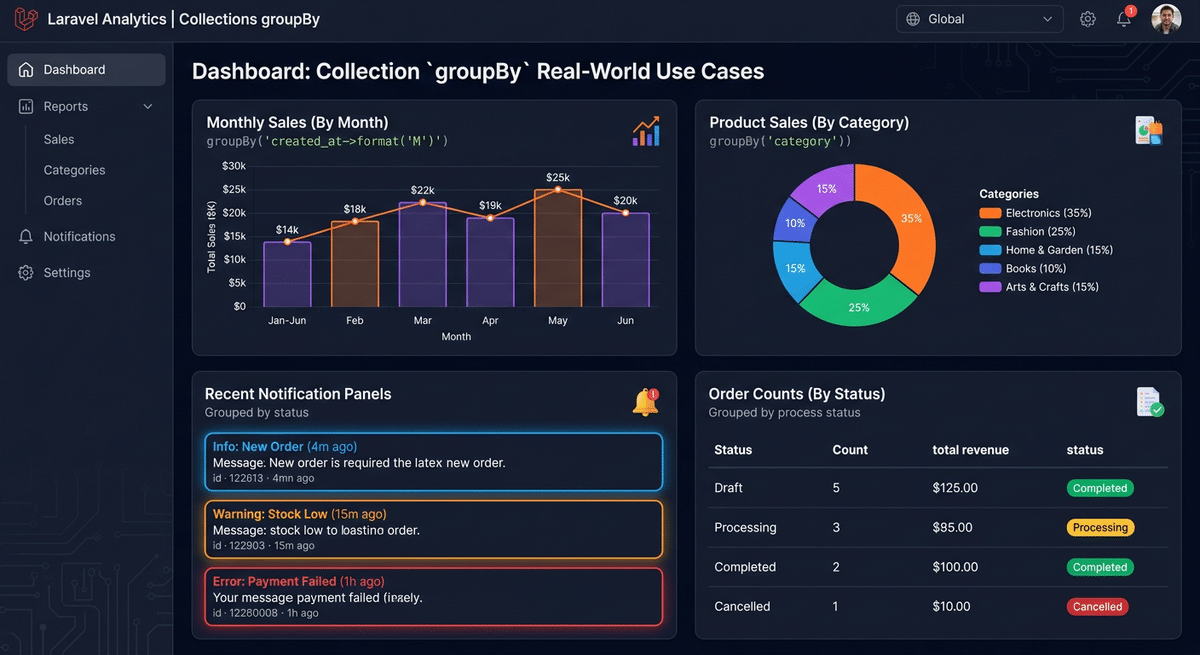
1. สรุปยอดขายตามเดือน
$sales = collect([
    ['date' => '2024-01-15', 'amount' => 500],
    ['date' => '2024-01-20', 'amount' => 300],
    ['date' => '2024-02-10', 'amount' => 700],
    ['date' => '2024-02-25', 'amount' => 200],
]);

$monthlySales = $sales
    ->groupBy(fn($sale) => substr($sale['date'], 0, 7)) // '2024-01', '2024-02'
    ->map(fn($month) => $month->sum('amount'));

// Collection {
//     '2024-01' => 800,
//     '2024-02' => 900,
// }
2. จัดกลุ่ม notifications ตามประเภท
$notifications = collect([
    ['type' => 'email', 'title' => 'Welcome', 'read' => false],
    ['type' => 'sms', 'title' => 'Alert', 'read' => true],
    ['type' => 'email', 'title' => 'Reminder', 'read' => false],
]);

$grouped = $notifications->groupBy('type')
    ->map(fn($items) => $items->groupBy('read'));

// Collection {
//     'email' => Collection({
//         false => Collection([...unread emails...]),
//         true => Collection([]),
//     }),
//     'sms' => Collection({...}),
// }
groupBy() vs similar Methods
| Method | การทำงาน | ใช้เมื่อ |
|---|---|---|
groupBy() |
จัดกลุ่มแล้วคืน Collection ของ Collections | ต้องการจัดกลุ่มแล้วประมวลผลแต่ละกลุ่ม |
keyBy() |
สร้าง associative array โดยใช้ key ที่กำหนด | ต้องการเข้าถึงข้อมูลด้วย key ที่กำหนด |
partition() |
แบ่ง Collection ออกเป็น 2 กลุ่มตามเงื่อนไข | ต้องการแบ่งแค่ 2 กลุ่ม (true/false) |
chunk() |
แบ่ง Collection ออกเป็นส่วนๆ ตามขนาด | ต้องการประมวลผลทีละส่วน |
สรุป
groupBy() เป็น method ที่ทรงพลังและใช้งานได้หลากหลายสำหรับการจัดกลุ่มข้อมูลใน Laravel Collections ไม่ว่าจะเป็นการจัดกลุ่มตาม key ตรงๆ ด้วย string หรือการจัดกลุ่มด้วยเงื่อนไขที่ซับซ้อนด้วย callback function และยังสามารถจัดกลุ่มหลายระดับได้อีกด้วย
เมื่อใช้ร่วมกับ methods อื่นๆ เช่น map(), count(), sum() หรือ pluck() จะช่วยให้การประมวลผลและวิเคราะห์ข้อมูลทำได้อย่างมีประสิทธิภาพและโค้ดสะอาดมากขึ้น
ชอบบทความนี้? ติดตามบทความเกี่ยวกับ Laravel Collections ต่อไปได้ที่ ITPHITPAT และอย่าลืมเรียนรู้ methods อื่นๆ ที่มีประโยชน์เช่น keyBy(), partition() และ chunk() ด้วยนะครับ!


